I was curious about which RGB colors map to the same shade of gray. The question came from making a header icon for this blog. The template I use turns header icon gray until you hover over it. That got me thinking about what else I could do with color. There are lots of RGB colors, but which colors collapse to the same gray?
One common way to represent color is the RGB color model. It can represent a large range of colors by mixing red, green, and blue in different proportions. In the 8-bit RGB representation used here, each component (R, G, and B) is an integer from 0 through 255. Zero means none of that color and 255 means the maximum. That gives us 256 choices for each component, or 256x256x256 possible RGB colors. Some examples:
(0, 0, 0)
(255, 255, 255)
(255, 0, 0)
(0, 255, 0)
(0, 0, 255)
(255, 255, 0)
(0, 255, 255)
(98, 98, 98)
As a teaser, I added a gray color as an example. Notice anything about it? In the RGB representation, a gray color has equal components: R = G = B. That includes black and white:
(19, 19, 19)
(78, 78, 78)
(163, 163, 163)
(201, 201, 201)
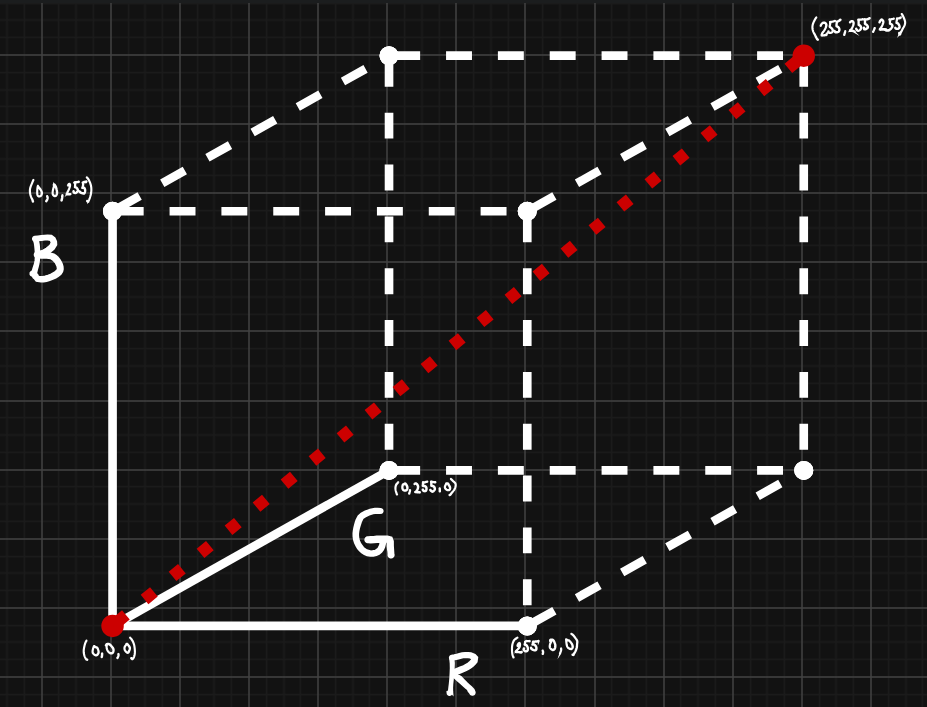
Since R, G, and B must be equal, there are 256 possible RGB grays: (0, 0, 0), (1, 1, 1), …, (255, 255, 255). That’s 256 shades of gray. If we represent all RGB colors as a 256x256x256 cube, these grays lie on the line segment from (0, 0, 0) to (255, 255, 255). The gray line is shown as a red dotted line in the image below (yes, yes… the irony).
Now we know how RGB colors are represented. But how do we know which color maps to which shade of gray? There are many ways to do this. The template’s grayscale effect uses a browser filter; for the examples and geometry in this post, I’ll use this weighted formula to calculate the grayscale value:
g = 0.2126R + 0.7152G + 0.0722B
shade of gray = round(g)
Here you can find why these particular numbers are used.
Math alert!
For the geometry, it helps to temporarily treat R, G, and B as continuous values rather than integers. Then g can be a value like 2.3, 55.1, or 222.9. The actual RGB representation still uses integer components, and the final shade of gray is also an integer from 0 to 255: for example, 2.3 rounds to 2, 55.1 to 55, and 222.9 to 223.
Why is this important, you may ask… For every fixed value of g, the equation describes a plane in continuous RGB space. For example, setting g = 138 gives:
0.2126R + 0.7152G + 0.0722B = 138
This plane contains all continuous RGB points whose calculated grayscale value is exactly 138. Without rounding, those points would map to the same value. Let’s try a few actual RGB colors, using g = 138:
(138, 138, 138)
These colors all round to a shade of gray of 138:
(227, 124, 16)givesg = 138.10(243, 106, 148)givesg = 138.16(255, 117, 8)givesg = 138.47- …
Without round(), a fixed grayscale value gives us a plane. With round(), colors that produce the same integer shade occupy a region around that plane. round() takes our infinitely thin plane and gives it some thickness or a slab.
For this discussion, rounding means going to the nearest integer, with exact halfway cases going up. So a continuous value rounds to integer n when:
n - 0.5 <= 0.2126R + 0.7152G + 0.0722B < n + 0.5
The boundaries are halfway between neighboring integer values: 137.5 separates values rounding to 137 from those rounding to 138, and 138.5 separates values rounding to 138 from those rounding to 139.
Here is an animation of the two boundary planes of a slab. All points between the green and purple planes belong to it. This is plotted in a 20×20×20 box so the distance between the planes is easier to see. The animation is made in Desmos.
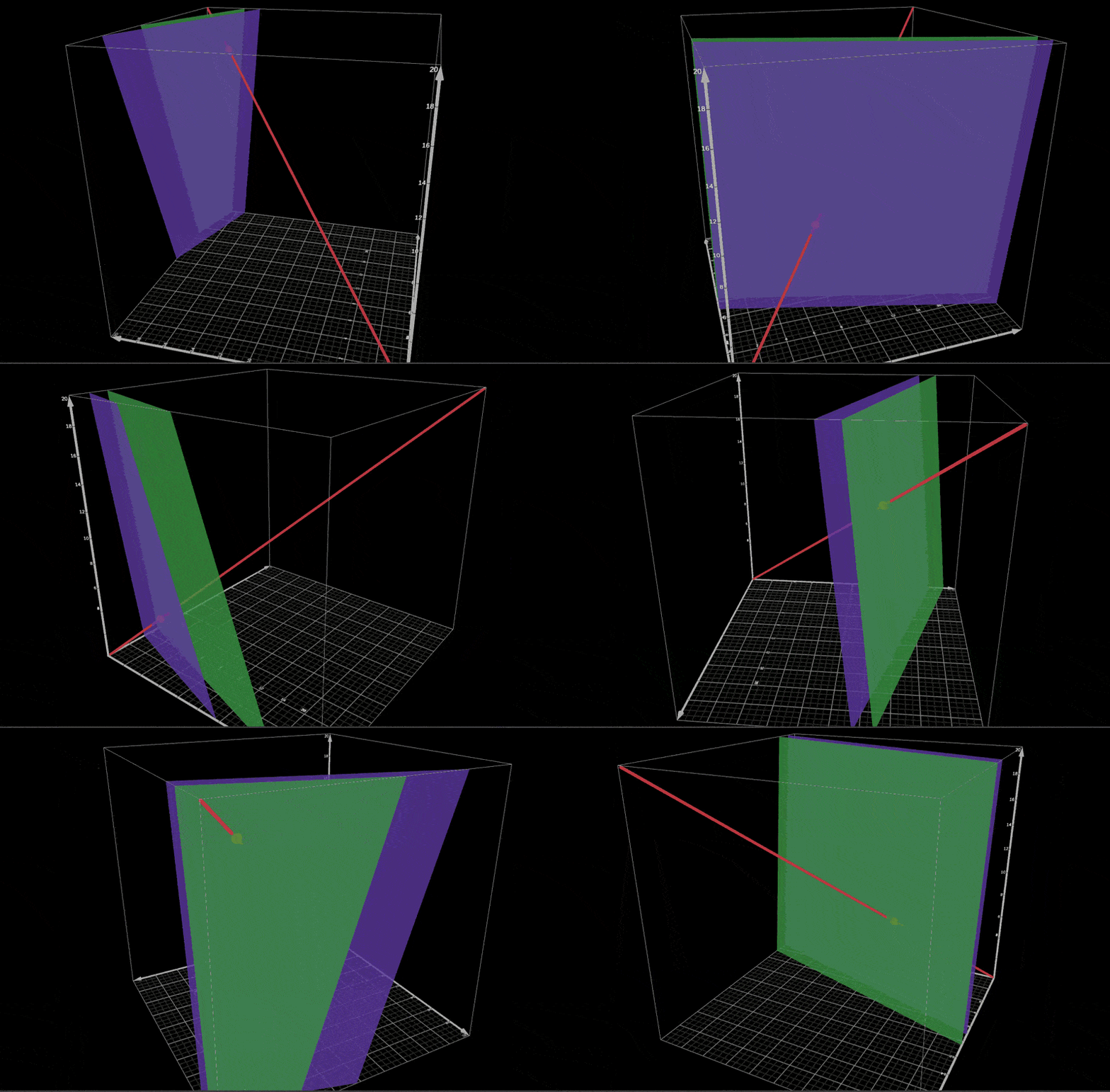
We can see the gray line intersecting both planes. The gray RGB color for the target value lies halfway between those intersections, because the planes represent the half values (0.5, 1.5, 2.5, …, 254.5).
So now we know how to find colors that map to a particular shade of gray. Let’s use that to make the logo. I chose a target shade of gray of
(200, 200, 200). One limitation is that choosing the target gray also limits how dark the original colors can be. Since gray 200 is already fairly bright, a very dark RGB color cannot have a weighted value of 200. So if I want strong contrast in the original logo, gray 200 isn’t a great choice. Teal and yellow kind of work, though, and for now this will do. My chosen yellow is
(249, 204, 10), and my chosen teal is
(0, 254, 248).
Let’s check whether yellow maps to gray 200:
0.2126*249 + 0.7152*204 + 0.0722*10 = 199.5602
round(199.5602) = 200
And teal:
0.2126*0 + 0.7152*254 + 0.0722*248 = 199.5664
round(199.5664) = 200
Then all that’s left is to use these colors in the logo. I drew my desk in draw.io and used the chosen colors plus black. Here’s the result:

And when I convert the image to grayscale:

This was a fun little experiment… for me at least :) Thanks for reading!